Advertising
Meta ads + AutomateNexus CRM
Facebook and Instagram ad results beside the leads, deals and money each ad brought in, with alerts, budget controls and the Conversions API.
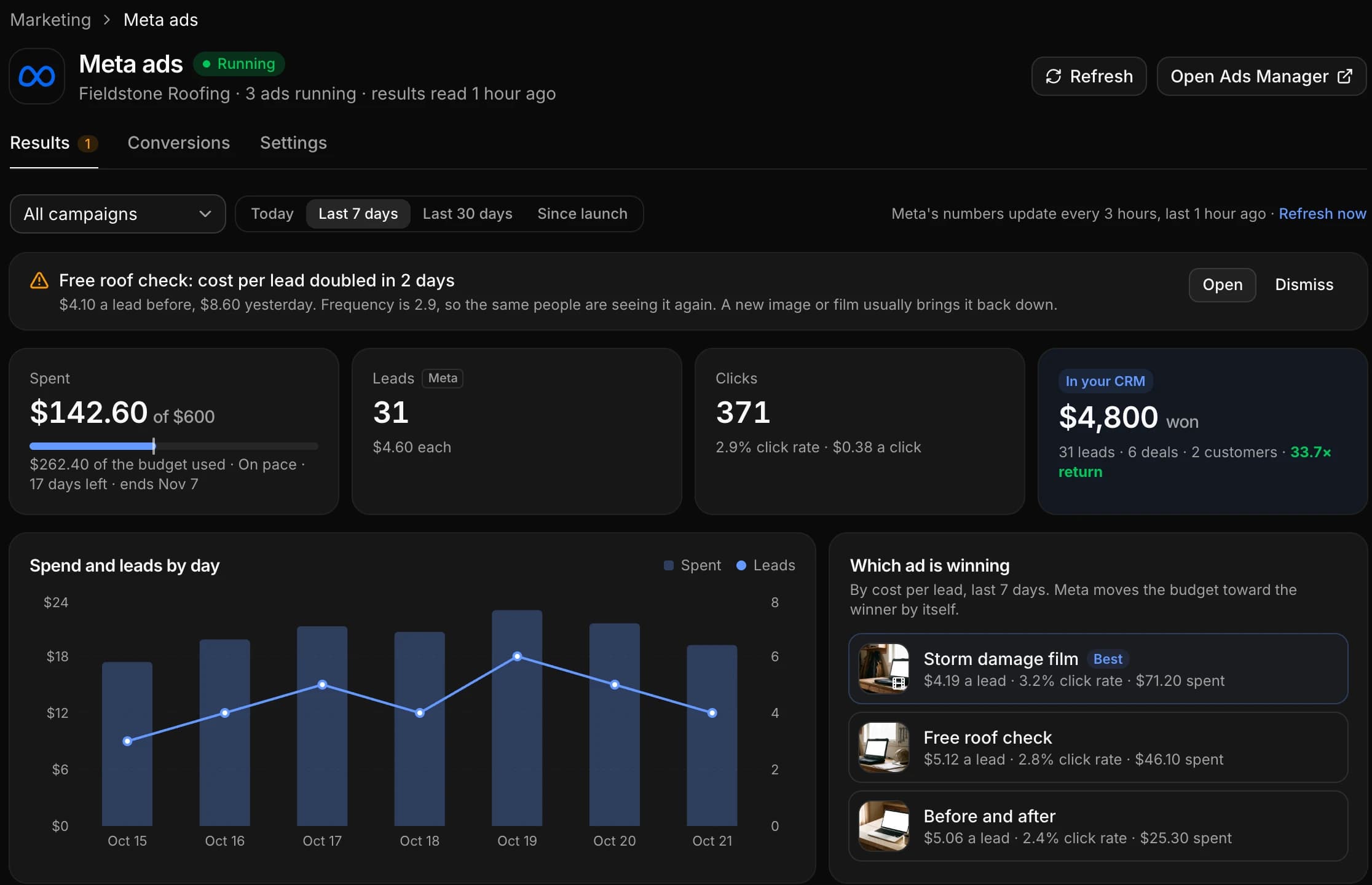
Meta ads, wired into your pipeline.
- 01
Meta's numbers, read for you
Spend against the budget and its pace, results and the cost of each, clicks, by day and by campaign, ad set or ad, which ad is winning and where each one ran, read from Meta every 3 hours.
- 02
What each ad brought into the CRM
The leads, bookings, deals and money won from every ad, with the cost per customer, counted by your CRM beyond Meta's 7 days, and the people each ad brought in.
- 03
Alerts, controls and Karrie
Alerts for a rejected ad, a failed payment, a budget nearly spent, a cost per result that jumps and an ad wearing out; a Monday summary; pause, resume and budgets with a confirm step; and Karrie answers "How are my ads doing?"
Connected in three steps.
- Step 01
Make a system-user token
In Meta Business settings, add a system user, give it your ad account and generate a token with ads_read, plus ads_management if you want to pause and change budgets from the CRM.
- Step 02
Paste it in Marketing → Meta ads
Open Marketing → Meta ads in the CRM, paste the token and pick the ad account. The screen walks through each click in Meta; it takes about two minutes.
- Step 03
Pick your alerts
Under Settings, choose the alerts you want, whether the Monday summary goes out, and whether owners and admins or owners only may change ads.
Built to be left alone.
Read every 3 hours
The CRM reads your results from Meta every 3 hours, and Refresh reads them again on demand. Any ad opens in Ads Manager in one click.
Nothing changes without a yes
Every pause, resume and budget change waits for a confirm, re-reads Meta first and is logged with who made it. Karrie's suggestions are cards an owner or admin approves.
Only what you allow
The CRM works with the ad account you pick and the permissions you give the token: results need ads_read only, and the controls appear when the token also has ads_management.
Lead forms in, conversions out.
Facebook and Instagram lead forms
With your Page connected, each lead from your instant forms arrives as a contact with every answer, the form and the ad it came from. One-click Facebook Page connect is coming soon; until then, bring lead form leads in through Zapier or Make.
The Conversions API
On the Conversions tab of the same page, the CRM sends your leads, bookings and sales to Meta from the server, alongside your pixel. Visitors who decline cookies are sent nowhere.
The ad, kept on the person
Forms on your website, booking pages, checkouts and website chat keep the visitor's ad click and utm tags, so whatever they do later counts towards the ad that brought them.
Meta ads and AutomateNexus CRM, answered.
Yes. AutomateNexus CRM connects to your Meta ad account with a system-user token from Meta Business settings, and Marketing → Meta ads then shows your Facebook and Instagram ads' results beside the leads, deals and money each ad brought into the CRM.
ads_read to see results. Add ads_management if you want to pause, resume and change budgets from the CRM; without it the page shows results only.
With your Page connected, yes: each lead arrives with every answer, the form and the ad. Connecting a Page in one click is coming soon; until then, Zapier or Make bring lead form leads into the CRM.
Yes. Meta ads is part of the Marketing module on every plan. Meta bills your ad spend as it always has.
Put Meta ads to work.
Start your 7-day free trial and connect Meta ads on day one. No credit card, no middleware.