Templates
Start from something that already works.
76 ready-made templates ship inside AutomateNexus CRM: automation workflows, agent roles, contracts, proposals, forms, email and SMS, knowledge pages, websites, and projects. Every one is editable, and anything you build can become a template too.
- templates
- 76
- groups
- 11
Templates you can take away.
Each kit is the complete version of one job, in Word, Excel or PDF, free for an email address. Read the templates on the page first; no signup needed for that.
More free kits in Resources- 01Cold Email KitTen cold emails and a four-touch sequence that earn replies without tricks.Ten minutes to set up. One afternoon to write your first twenty. 3 files: DOCX, XLSX, PDF.
- 02Follow-Up Email PackAll 23 follow-up templates in Word, plus a planner that dates every follow-up for you.Five minutes to set up. Then paste, fill the brackets, send. 2 files: DOCX, XLSX.
- 03Cold Call Script KitOpen, qualify and book the meeting in a five-minute call, word for word.Ten minutes to learn. Print the card and dial. 3 files: DOCX, PDF, XLSX.
- 04Proposal Template KitA proposal your client can say yes to on the first read.An hour for your first proposal. Twenty minutes after that. 2 files: DOCX, PDF.
- 05Quote Template KitA professional quote with totals, discounts and tax worked out for you.Ten minutes to add your details. Two minutes per quote after that. 2 files: XLSX, DOCX.
- 06Sales Pipeline TrackerEvery deal, stage and next step on one sheet, with the weighted total worked out.Fifteen minutes to load your deals. Five minutes a week to keep it true. 2 files: XLSX, PDF.
- 07Sales Forecast WorkbookA forecast you can defend: weighted pipeline, run rate and a 12-month view in one workbook.Thirty minutes to set up with your numbers. Ten minutes a week after that. 2 files: XLSX, PDF.
Automation workflows.
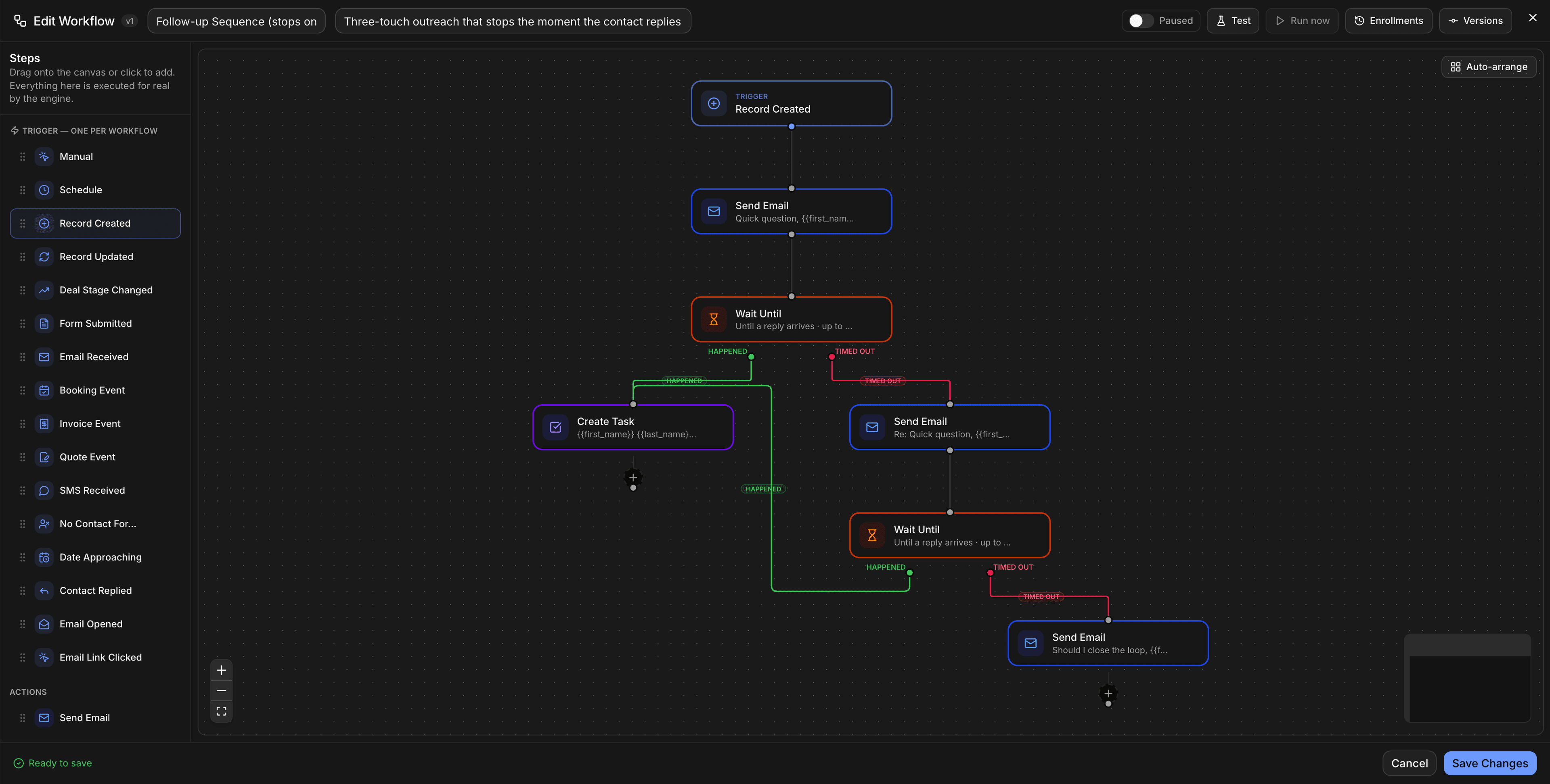
Pre-built workflows for the moments every pipeline shares. Open one on the canvas, adjust the conditions, and switch it on; each runs on the same triggers, branches, and actions the builder gives you from scratch.
- In the app
- Automations → Templates (visual builder gallery)
Follow Up on Stale Deals
A daily check that finds deals with no activity past your threshold and queues a drafted nudge to the owner.
Welcome New Contacts
Runs when a contact is created: the welcome email, the owner assignment, and the first task.
Assign Leads by Region
Routes new leads to the right rep by territory the moment they arrive.
Send NPS After Deal Closed
Fires on a won deal and sends the survey after the delay you choose.
Escalate Overdue Tasks
Flags tasks past their due date to the owner and their manager.
Deal Stage Change Alerts
Posts a notification whenever a deal moves stage, with the who and the why.
Lead Nurturing Drip Campaign
A spaced sequence of touches for leads that aren't ready yet.
Invoice Payment Reminder
Polite, scheduled reminders for invoices that are due or past due.
Lead Nurturing Email Sequence
A multi-step email sequence you can attach to any segment or stage.
Customer Onboarding Workflow
The tasks, emails, and check-ins that follow a signed deal.
Deal Closing Process
The closing checklist as a workflow: proposal, signature, invoice, handoff.
AI agent templates.
Each specialist agent ships as a template with a role, a system prompt, recommended tools, and a recommended model. Duplicate one, change what it's allowed to do, and set its autonomy from draft-only to approve-first to autonomous within limits. Karrie, the Scheduler, and Analytics forecasting are built into the platform rather than templated.
- In the app
- Agents → Templates
Sales Agent
Drafts follow-ups, books meetings, and keeps every deal moving.
Support Agent
Answers customers, routes tickets, and flags churn risk early.
Marketing Agent
Generates campaigns, scores intent, and nurtures cold leads.
Operations Agent
Handles meetings, tasks, activities and workflows.
Research Agent
Enriches contacts and briefs you before every call.
Social Content Agent
Drafts posts for the social queue in your voice, for approval.
Documents and contracts.
Built-in document templates with merge variables for customer, company, dates, and amounts. Generate from any record, edit, and send for e-signature without leaving the CRM.
- In the app
- Documents → Templates → Built-in
Service Agreement
Comprehensive service contract covering terms, compensation, liability, and governing law.
Non-Disclosure Agreement
Mutual confidentiality terms for conversations that need them.
Statement of Work
Scope, deliverables, timeline, and acceptance for a defined engagement.
Business Proposal
A structured proposal with the problem, the approach, and the investment.
Consulting Agreement
Engagement terms for advisory and consulting work.
Employment Offer Letter
Role, compensation, start date, and conditions for a new hire.
Invoice Template
A document-style invoice for clients who need one alongside the payment link.
Meeting Minutes
Attendees, decisions, and actions, ready to file on the record.
Proposals and quotes.
A default engagement proposal that clients review, sign, and pay from one page, plus quote templates for the common commercial shapes.
- In the app
- Proposals → Default template · Quotes → Templates
Engagement Proposal
Scope, deliverables and investment, review, sign and submit payment, kickoff call, in one flow.
Basic Product Quote
Line items, quantities, and totals for a straightforward product sale.
Enterprise Annual License
Annual licence pricing with terms for larger accounts.
SaaS Monthly Subscription
Recurring monthly pricing with seats and add-ons.
SaaS Annual Subscription
Annual recurring pricing with the discount stated.
Professional Services Project
Fixed-scope project pricing with milestones.
Monthly Retainer
Ongoing services at a monthly rate with what's included.
Forms.
Starter forms for the form builder. Each posts straight into the CRM as a contact, lead, or submission with the source attached, and the builder's conditional logic and signature field are available on all of them.
- In the app
- Content → Forms → New form → Start from a template
Contact form
Name, email, phone, message. The one every site needs.
Lead capture
Work email, company, and UTM source, medium, and campaign captured automatically.
Feedback + rating
A rating scale with a free-text follow-up.
Client onboarding
Project type, project details, and a signature to confirm.
Event registration
Ticket type and dietary restrictions alongside the basics.
Newsletter signup
Email address, one field, done.
Email designs.
Campaign layouts for the email editor, in a starter set and a premium set with richer hero and call-to-action blocks. Pick one, drop in your copy, and send to a segment.
- In the app
- Marketing → Email → New campaign → Templates
Simple
A clean single-column message for announcements that should read like a note.
Newsletter
Sections and links for a regular digest.
Announcement
One message, one visual, one call to action.
Promotion
Offer, deadline, and a prominent button.
Welcome
The first email after a signup or purchase.
Event invite
Date, details, and an RSVP button.
Product launch
A hero announcement layout for something new.
SMS templates.
Message templates for the built-in telephony, organised by purpose so reps and automations send consistent texts.
- In the app
- Communications → SMS → Templates
General
Everyday replies and check-ins.
Reminder
Appointment and payment reminders with the details merged in.
Follow-up
The touch after a call, a quote, or a visit.
Promotion
Offers for contacts who have opted in to marketing texts.
Notification
Status updates: booked, shipped, paid, done.
Invoice emails.
The three emails every invoice needs, pre-written with merge fields and editable per organisation.
- In the app
- Settings → Invoicing → Email templates
Invoice sent
Delivers the invoice with the amount, due date, and payment link.
Payment reminder
A polite reminder when an invoice is due or overdue.
Payment received
Confirms the payment and closes the loop.
Knowledge base articles.
Page templates for the knowledge workspace, so SOPs and guides start with the right structure and Ask AI has clean sections to cite.
- In the app
- Knowledge → New page → Templates
Standard Operating Procedure
Purpose, scope, steps, and owner.
FAQ Article
Question-and-answer pairs that Ask AI and the portal can surface.
How-To Guide
Numbered steps with screenshots and expected results.
Troubleshooting Guide
Symptom, cause, fix, in a table your support team can scan.
Runbook
The operational checklist for a recurring or emergency task.
Onboarding Checklist
Everything a new client or hire needs in their first weeks.
Policy Document
Policy statement, scope, responsibilities, and review date.
Release Notes
What changed, why, and what to do about it.
Website templates.
Starting points for the built-in site builder. Each is a full site of blocks you can rearrange, restyle, and publish to a subdomain or export to your own GitHub repository.
- In the app
- Marketing → CMS & Website Builder → New site → Browse templates
SaaS landing
Hero, features, pricing, and FAQ for a software product.
Agency / services
Services, work, and a book-a-call flow.
Local business
Hours, location, services, and a contact form.
Portfolio
Work samples with a simple about and contact.
Startup / Product
A product story with a waitlist or signup.
Restaurant / Café
Menu, hours, and reservations.
Event / Conference
Agenda, speakers, and registration.
Industry sites
Fourteen four-page sites for a trade: plumbing and HVAC, law firm, dental clinic, real estate agent, fitness studio, salon and spa, consultant, nonprofit, photographer, contractor, accounting, auto repair, online course, and cleaning service.
Projects and tasks.
Save any project as a template and create the next one from it, tasks, dependencies, and budget included. Templates linked to the storefront create a project automatically when a service order is paid. Task templates give delegated work a consistent shape.
- In the app
- Projects → Templates · Tasks → Delegate → Templates
Project templates
Your own, saved from any project, with optional pipeline and storefront links.
Bug Fix
Reproduction, expected behaviour, fix, and verification.
Feature Development
Spec, implementation, review, and release steps.
Code Review
A checklist for reviewing someone else's change.
Design Review
Criteria and sign-off for a design deliverable.
QA Testing
Test plan, cases, and results.
Content Writing
Brief, draft, edit, and publish.
Templates, answered.
Yes. Templates are part of the product, not a paid pack. The feature a template belongs to follows that feature's plan rules: for example, campaign templates send through your own email provider or hosted sending, and website templates publish within the site builder's limits.
Yes. Save any project, email, form, document, quote, or knowledge page as a template, and duplicate an agent template to change its role, tools, and autonomy. Automations can also be imported from a file or generated from a plain-English description.
Yes. Templates live at the organisation level, so an agency can standardise onboarding, proposals, and automations once and reuse them across client workspaces.
Each group above lists its location. Most sit behind a New button (New campaign, New form, New site) or under a Templates tab in the relevant module.
Open a template and ship it today.
Every template is in the 7-day free trial from minute one. No credit card.