Feature
Meta ads in your CRM, every lead back to its ad.
See what every Facebook and Instagram ad spends, which one is winning, and the leads, deals and money each one brought in. Alerts when something needs you, a Monday summary, and pause or change budgets from the CRM.
- between reads from Meta
- 3 h
- kinds of alert
- 6
- a month, every plan
- $49
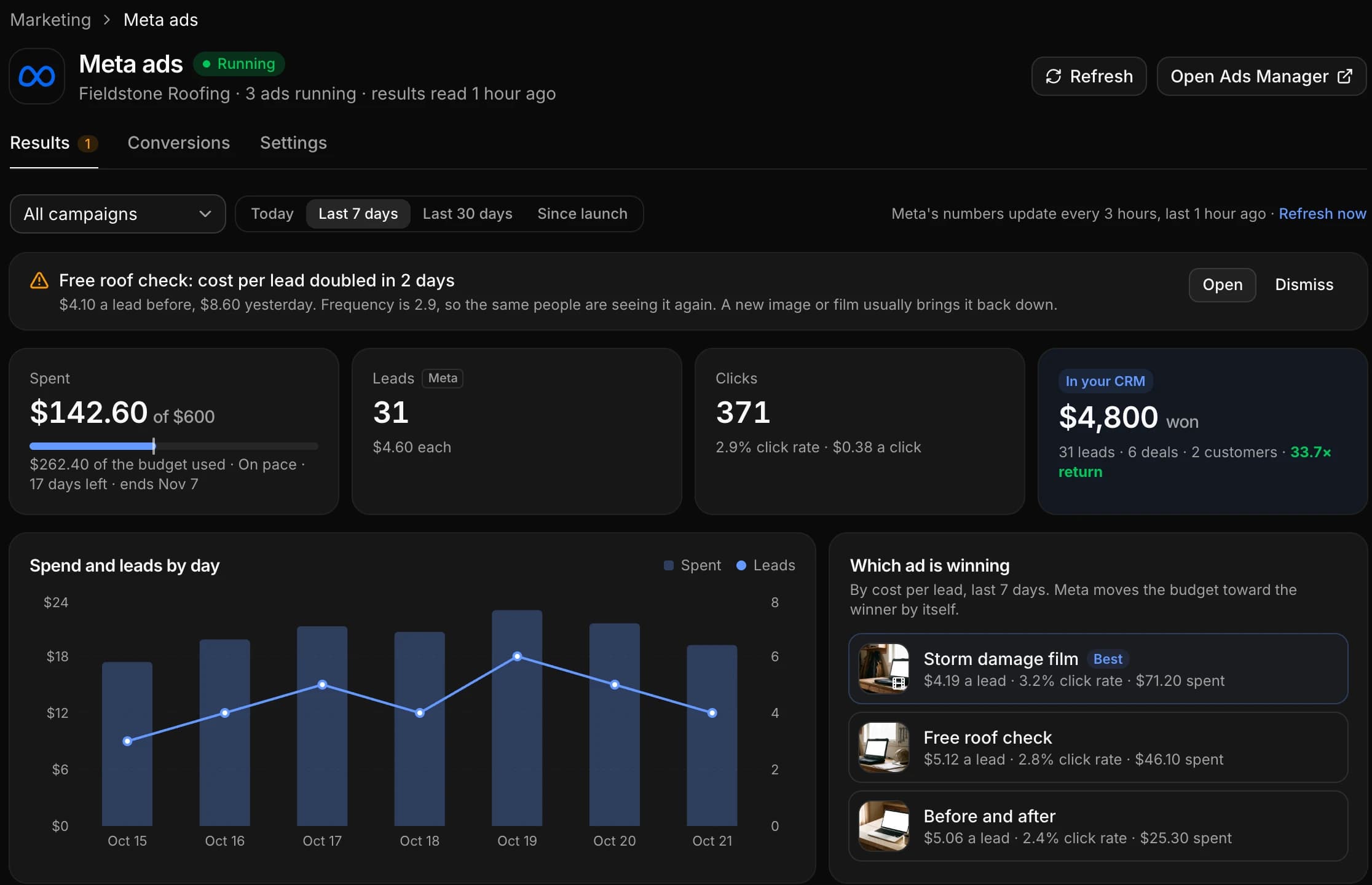
AutomateNexus CRM puts your Meta ads inside the CRM. Marketing → Meta ads shows your Facebook and Instagram ads with Meta’s own numbers, spend, results, cost per result and clicks, and beside them what each ad brought into your CRM: the leads, bookings, deals and money won.
Ads Manager can tell you which ad is cheapest. Your CRM knows which one brought customers. Here they are one screen, with alerts so you don’t have to keep checking, and the controls to pause an ad or change a budget when the numbers say so.
Marketing → Meta ads, as it works today.
Real screens from the product, with a made-up roofing business.
Stop checking Ads Manager.
Meta's numbers for every campaign, ad set and ad, read for you and set out the way a business owner reads them.
- 01
Spend against the budget
What you have spent, of what budget, and whether it is on pace to last until the campaign ends, with the days left.
- 02
Results, and what each one cost
Leads, sign-ups, bookings or sales, named the way your campaign counts them, with the cost of each. Clicks, click rate and cost per click beside them, and impressions, reach and frequency on every ad.
- 03
By day, by campaign, by ad
Today, the last 7 or 30 days, or since launch, for every campaign or one, with spend and results drawn day by day. Narrow it to a campaign, an ad set or a single ad.
- 04
Which ad is winning
Your ads ranked by cost per result, each with its own picture or video still, so the ad worth more budget is the first thing you see.
- 05
Where it ran
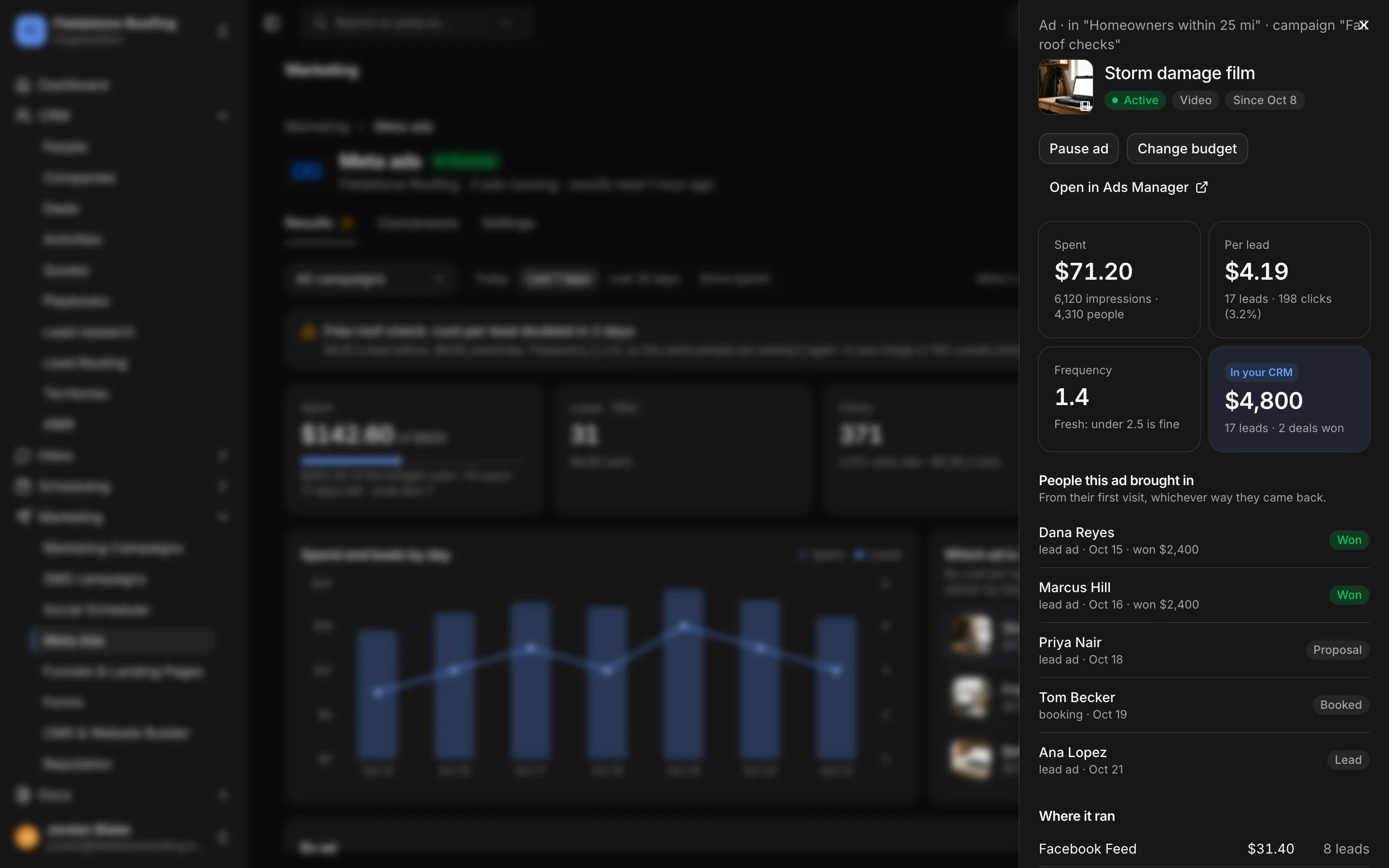
Open an ad to see where Meta showed it, Facebook Feed, Instagram Reels, Stories and the rest, with the spend and results for each placement.
- 06
Fresh without checking
The CRM reads your results from Meta every 3 hours, and Refresh reads them again when you want them now. Open in Ads Manager is one click away for everything else.
What each ad actually brought in.
The cheapest lead is not always the best ad. Beside Meta's numbers, each ad shows what your CRM counted from it.
- 01
Leads, bookings, deals and money won
For every ad, what your CRM counted from it: the leads it brought, the bookings they made, the deals they opened and the money won, with the cost per customer and the return on what the ad spent.
- 02
Beyond Meta's 7 days
Meta credits a result to an ad for a few days after the click. Your CRM keeps the ad on the person, so a deal won six weeks later still counts towards the ad that first brought them in.
- 03
The people behind every ad
Open an ad and see who it brought in, how they arrived (a lead form, a booking, a form on your site) and how far each one got: lead, booked, proposal, won.
The ad is kept from
- Facebook and Instagram lead forms
- Forms on your website, embedded or built in the CRM
- Booking pages
- Checkouts
- Chat on your website
- Ad clicks (fbclid) and utm tags, kept on the person
It watches your ads so you don't have to.
Alerts arrive in your notifications and in Karrie's daily brief, and on the results page until you open or dismiss them. Choose which you want under Settings.
- An ad rejected, with Meta's reason in plain words and what to change
- A failed payment or a restricted ad account
- A budget or spending limit 80% used
- A cost per result that jumps
- An ad wearing out: the same people seeing it too often
- Stuck in learning limited, if you switch it on
A Monday summary in your inbox
Every Monday morning: last week’s spend, results and cost per result, the best ad, and what your ads brought into the CRM. Switch it off under Settings if you would rather not.
Pause and budgets, with a confirm step.
When the numbers say an ad should stop or get more, do it from the screen you are reading, with nothing changing until you confirm.
- 01
Pause and resume
Pause an ad, an ad set or a campaign from the CRM, or start it again, without opening Ads Manager.
- 02
Change a budget
Raise or lower a campaign's or ad set's daily or lifetime budget, in your account's currency. Before it changes, the CRM reads the budget from Meta again and stops if someone changed it there in the meantime.
- 03
A confirm step, every time
Every change shows what it will do and waits for a yes. A budget can't be multiplied tenfold in one step, and a lifetime budget never drops below what is already spent.
- 04
A change log
Every pause, resume and budget change is kept, with who made it and when.
- 05
Who may change ads
Owners and admins, or owners only if you choose. Everyone else in the workspace sees the results without the buttons.
Ask how your ads are doing.
Karrie, the AI co-pilot in every plan, reads the same numbers you see.
- She answers
- Ask "How are my ads doing?" or "Which ad brought the most customers this month?" and she answers from your real results and what the CRM counted, naming the ads.
- She suggests
- When an ad costs too much for what it brings, she can propose pausing it. The proposal is a card an owner or admin approves: nothing changes in Meta until then.
- She reports
- Admins get a line about the ads in Karrie's daily brief, with any alert that needs them.
Leads in from Meta, results back to Meta.
The same page brings Facebook and Instagram lead form leads into the CRM and sends what happened next back to Meta.
- 01
Facebook and Instagram lead forms
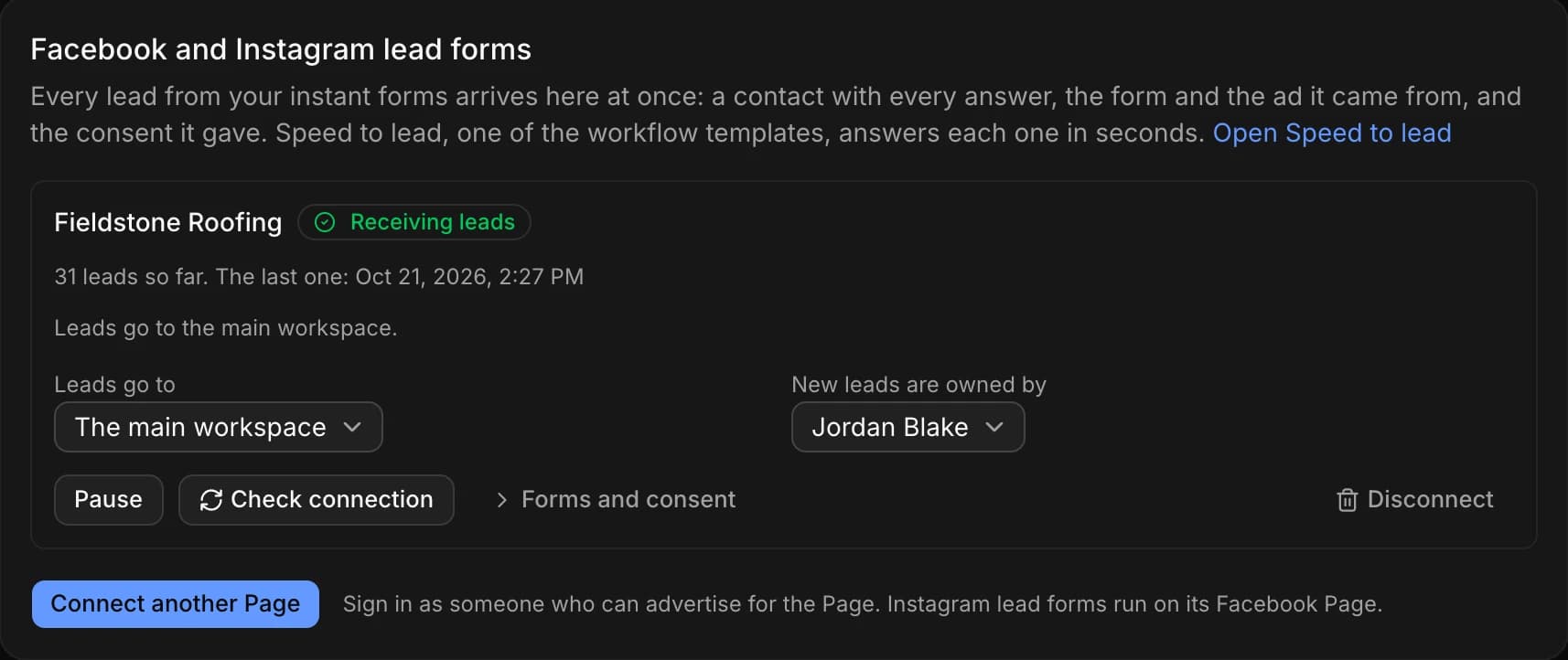
With your Page connected, every lead from your instant forms lands in the CRM at once, a contact with every answer, the form and the ad it came from, and counts towards that ad. Speed to lead, one of the workflow templates, answers each one in seconds. One-click Facebook Page connect is coming soon; until then, bring lead form leads in through Zapier or Make.
- 02
The Meta Conversions API
On the Conversions tab, the CRM sends your leads, bookings and sales to Meta from the server, alongside your pixel, so your ads keep measuring results when a browser blocks tracking. Visitors who decline cookies, and anyone unsubscribed, are sent nowhere.
About two minutes in Meta's Business settings.
A system-user token with ads_read shows your results; add ads_management to pause and change budgets from the CRM.
- Step 01
Make a token in Meta
In Meta Business settings, add a system user, give it your ad account, and generate a token. The screen in the CRM shows each click.
- Step 02
Paste it in the CRM
Open Marketing → Meta ads, paste the token and pick the ad account. The CRM reads your results from there.
- Step 03
Choose what you hear about
Under Settings, pick the alerts you want, whether the Monday summary goes out, and who may pause and change budgets.
One screen for the whole question.
Not which ad is cheapest, but which ad brought customers.
| Ads Manager on its own | Meta ads in AutomateNexus CRM | |
|---|---|---|
| What counts as a result | What Meta's pixel and lead forms report | Meta's results, and the leads, deals and money won your CRM counted |
| How long an ad gets credit | Meta's attribution window, a few days after the click | As long as the person is in your CRM |
| Who an ad brought in | A number | The people, by name, and how far each one got |
| Knowing something is wrong | Checking Ads Manager | An alert in your notifications and Karrie's daily brief |
| Lead form leads | Downloaded, or passed on by another tool | A contact with every answer, the form and the ad |
| Price | Meta charges for the ads | Included on every plan, from $49 a month. Meta still bills your ads. |
Meta first.
Facebook and Instagram are connected today. Google and YouTube ads are on the public roadmap. Whatever network a visitor comes from, a Google click ID and utm tags already travel with them into your website’s forms, booking pages and checkouts, so the CRM records where each lead came from.
Questions about Meta ads in the CRM
Yes. In AutomateNexus CRM, Marketing → Meta ads shows your Facebook and Instagram ads: spend against the budget and whether it is on pace, results and the cost of each, clicks, by day and by campaign, ad set or ad, and which ad is winning. Beside Meta's numbers it shows what each ad brought into the CRM: leads, bookings, deals and money won.
Ads Manager tells you what Meta counted. The CRM also knows who became a customer, so you see the deals and money each ad brought in, beyond Meta's attribution window, and the people behind every ad. Alerts and a Monday email mean you don't have to keep checking, and you can still open any ad in Ads Manager in one click.
The ad travels with the person. A lead form lead carries its form and ad, and a visitor who clicks an ad brings Meta's click ID and your utm tags to your forms, booking pages, checkouts and website chat, which keep them on the contact. When that contact books, opens a deal or pays, it counts towards the ad.
Yes, if your token includes ads_management. Pause, resume and budget changes each show what will happen and wait for a confirm, and every change is logged with who made it. Owners and admins can make changes, or owners only if you choose.
A rejected ad with Meta's reason, a failed payment or restricted account, a budget or spending limit 80% used, a cost per result that jumps, an ad wearing out, and, if you switch it on, an ad set stuck in learning limited. They arrive in your notifications and in Karrie's daily brief, and the Monday summary email covers last week.
Yes. Ask "How are my ads doing?" and she answers from your real numbers. If an ad is costing too much she can suggest pausing it, as a card an owner or admin approves before anything changes.
Yes. With your Page connected, every lead from your instant forms lands as a contact with every answer, the form and the ad it came from, and counts towards that ad. Connecting a Page in one click is coming soon; until then, bring lead form leads in through Zapier or Make.
Yes. The Conversions API, on the Conversions tab of the same page, sends your leads, bookings and sales to Meta from the server alongside your pixel, so your ads keep measuring results when a browser blocks tracking. Visitors who decline cookies are sent nowhere.
With a system-user token from Meta Business settings: add a system user, give it your ad account and generate a token with ads_read (and ads_management to pause and change budgets). Paste it in Marketing → Meta ads and pick the ad account. It takes about two minutes.
Meta, meaning Facebook and Instagram, is the one connected today. Google and YouTube ads are on the public roadmap. Visits from any ad that carry utm tags or a Google click ID are already kept on the people they bring in.
Nothing on top of your plan. Meta ads is included on every plan of AutomateNexus CRM, from $49 a month. Meta bills your ad spend as it always has.
What happens after the click.
- 01AI AgentsEight autonomous agents running your pipeline 24/7.Karrie, Sales, Support, Marketing, Ops, Scheduler, Research, and Analytics — each an autonomous agent that acts on your pipeline without being prompted.
- 02AI Website BuilderA website built by AI, edited in a visual builder, feeding your CRM.Tell the assistant about the business and it builds a complete multi-page website, then changes it as you ask. Edit by hand in a visual drag-and-drop builder with 29 block types, 21 templates and eight looks. Every form on the site creates a contact in your CRM, booking pages and your blog drop in as blocks, and the finished site is yours: published as static pages to your own GitHub repository and hosted on GitHub Pages, Netlify, Vercel or Cloudflare Pages.
- 03Marketing AutomationVisual workflows that run your follow-up while you sell.The visual workflow builder inside the CRM: trigger on any record change, branch on conditions, add delays, send email or SMS, assign tasks, move stages, and hand steps to Karrie — with a run log for every execution.
Connecting it? See Meta ads + AutomateNexus CRM.
See which ad brings customers.
Start your 7-day free trial. No credit card. Connect your ad account in Marketing → Meta ads and see your results the same day.