Feature
Marketing Automation
The visual workflow builder inside the CRM: trigger on any record change, branch on conditions, add delays, send email or SMS, assign tasks, move stages, and hand steps to Karrie — with a run log for every execution.
Visual workflows that run your follow-up while you sell.
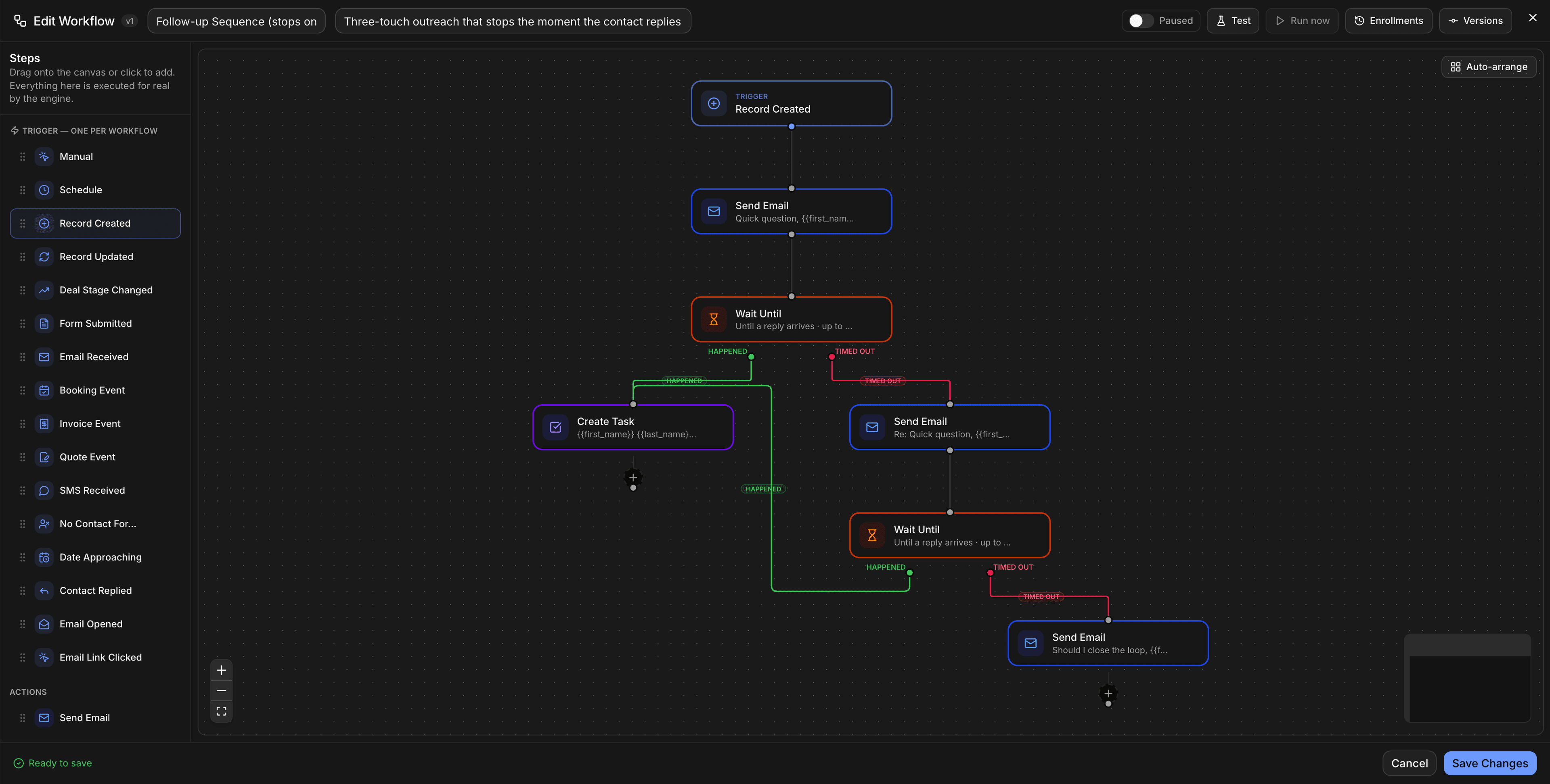
Everything in Marketing Automation, in one place.
No paid modules, no upgrade walls. These come standard, sharing the same records, automations, and agents as the rest of your CRM.
- Drag-and-drop workflow builder
- Triggers on any CRM event
- Branches, delays & conditions
- Email, SMS, tasks & stage moves
- Agent steps with human approval
- Run history & error log
The builder is documented step by step in the workflow builder guide. For the pipeline side of automation, see CRM automation.
Live in a day. Working for you on day one.
- Step 01
Connect in minutes
Turn it on from your workspace, sync the tools you already use, and your data lands clean and structured — no implementation project.
- Step 02
Let the agents work
Karrie and the specialist agents pick up the busywork: drafting, scheduling and lead scoring, with your approval where it matters and a full audit trail.
- Step 03
Ship outcomes faster
Your team focuses on the work only humans should do. Everything else runs on autopilot, with humans in the loop wherever it matters.
Marketing Automation plugs into the tools you already run.
With 60+ native integrations (Gmail, Outlook, Stripe, Twilio, Slack, Zoom, QuickBooks, WhatsApp, Zapier and n8n), your data syncs two ways and stays in sync. No middleware, no custom code.
Browse all integrations- Gmail
- Stripe
- Slack
- Zoom
- Twilio
- n8n
- Outlook
- QuickBooks
- Zapier
Every action an agent takes inside Marketing Automation is logged with a full audit trail, and sensitive steps wait for human approval, so you stay in control as automation scales.
Questions about Marketing Automation
The visual workflow builder inside the CRM: trigger on any record change, branch on conditions, add delays, send email or SMS, assign tasks, move stages, and hand steps to Karrie — with a run log for every execution.
Yes. Marketing Automation is part of the platform — it shares the same records, automations, and AI agents as the rest of your CRM, with no separate add-on or upgrade wall.
Minutes, not a migration project. Turn it on from your workspace, connect the tools you already use, and Karrie starts working on day one.
Yes — it connects to 60+ native integrations (Gmail, Outlook, Stripe, Twilio, Slack, Zoom, QuickBooks, WhatsApp, Zapier, n8n) with two-way sync and a full API.
Pairs well with the rest of the platform.
- 01AI AgentsEight autonomous agents running your pipeline 24/7.Karrie, Sales, Support, Marketing, Ops, Scheduler, Research, and Analytics — each an autonomous agent that acts on your pipeline without being prompted.
- 02AI Website BuilderA website built by AI, edited in a visual builder, feeding your CRM.Tell the assistant about the business and it builds a complete multi-page website, then changes it as you ask. Edit by hand in a visual drag-and-drop builder with 29 block types, 21 templates and eight looks. Every form on the site creates a contact in your CRM, booking pages and your blog drop in as blocks, and the finished site is yours: published as static pages to your own GitHub repository and hosted on GitHub Pages, Netlify, Vercel or Cloudflare Pages.
- 03Meta AdsYour Facebook and Instagram ads, next to the leads, deals and money each one brought in.Marketing → Meta ads shows what every Facebook and Instagram ad spends against its budget, its leads and cost per lead, and which ad is winning, beside what the CRM counted from it: leads, bookings, deals and money won, beyond Meta's 7 days. Alerts when an ad is rejected, a payment fails or a budget is nearly spent, a Monday summary by email, pause, resume and budget changes with a confirm step, and lead form leads that arrive with the ad that brought them.
Put Marketing Automation to work.
Start your 7-day free trial. No credit card. Karrie is ready on day one.