Feature
Project Management
Turn closed deals into projects with tasks, timelines, and client collaboration — so delivery never leaves the CRM.
Win the deal, then deliver the work.
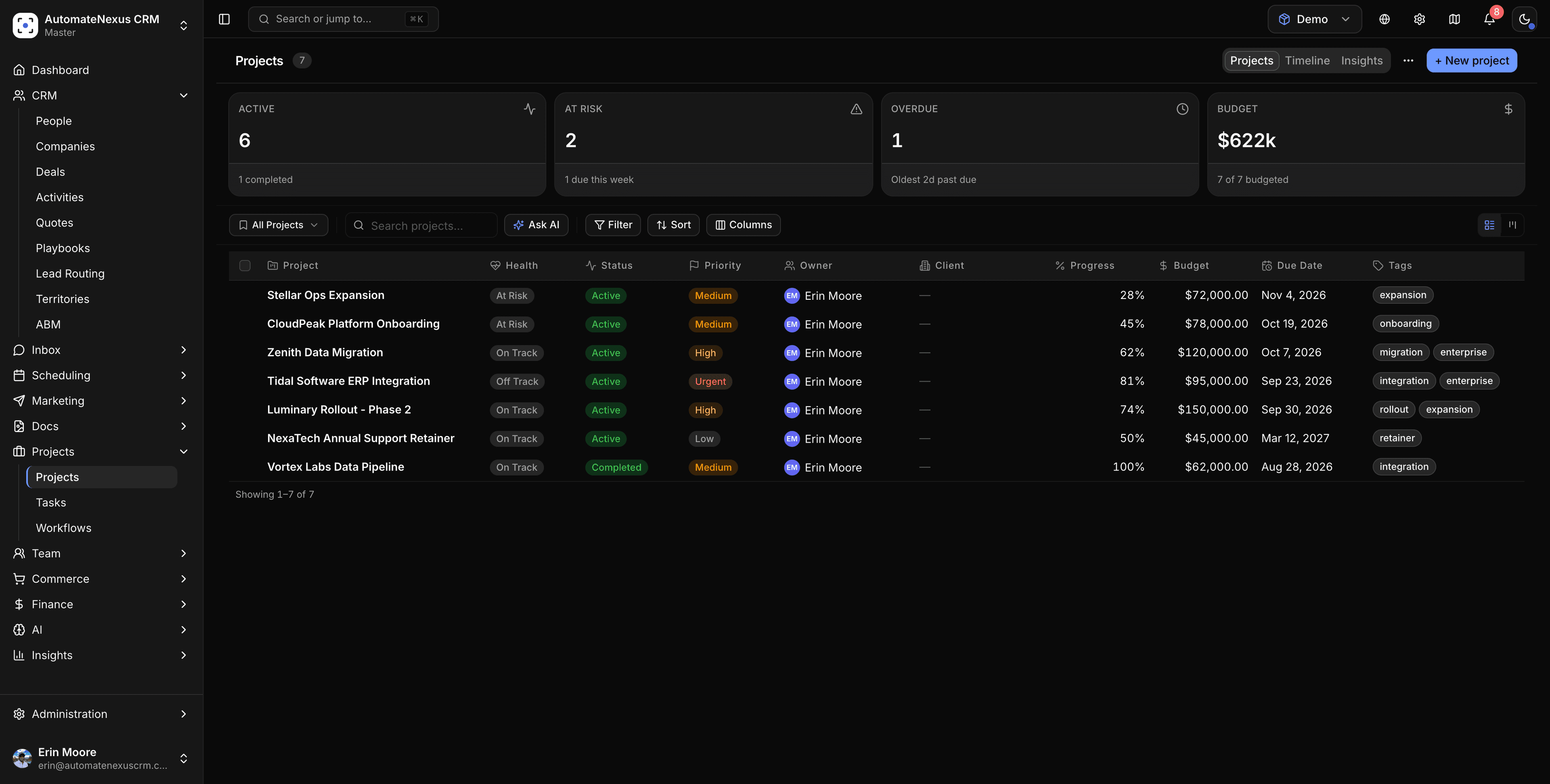

Everything in Project Management, in one place.
No paid modules, no upgrade walls. These come standard, sharing the same records, automations, and agents as the rest of your CRM.
- Tasks & boards
- Timelines & milestones
- Time tracking
- Client collaboration
- Templates
- Workload view
Live in a day. Working for you on day one.
- Step 01
Connect in minutes
Turn it on from your workspace, sync the tools you already use, and your data lands clean and structured — no implementation project.
- Step 02
Let the agents work
Karrie and the specialist agents pick up the busywork: drafting, scheduling and lead scoring, with your approval where it matters and a full audit trail.
- Step 03
Ship outcomes faster
Your team focuses on the work only humans should do. Everything else runs on autopilot, with humans in the loop wherever it matters.
Project Management plugs into the tools you already run.
With 60+ native integrations (Gmail, Outlook, Stripe, Twilio, Slack, Zoom, QuickBooks, WhatsApp, Zapier and n8n), your data syncs two ways and stays in sync. No middleware, no custom code.
Browse all integrations- Gmail
- Stripe
- Slack
- Zoom
- Twilio
- n8n
- Outlook
- QuickBooks
- Zapier
Every action an agent takes inside Project Management is logged with a full audit trail, and sensitive steps wait for human approval, so you stay in control as automation scales.
Questions about Project Management
Turn closed deals into projects with tasks, timelines, and client collaboration — so delivery never leaves the CRM.
Yes. Project Management is part of the platform — it shares the same records, automations, and AI agents as the rest of your CRM, with no separate add-on or upgrade wall.
Minutes, not a migration project. Turn it on from your workspace, connect the tools you already use, and Karrie starts working on day one.
Yes — it connects to 60+ native integrations (Gmail, Outlook, Stripe, Twilio, Slack, Zoom, QuickBooks, WhatsApp, Zapier, n8n) with two-way sync and a full API.
Pairs well with the rest of the platform.
- 01AI AgentsEight autonomous agents running your pipeline 24/7.Karrie, Sales, Support, Marketing, Ops, Scheduler, Research, and Analytics — each an autonomous agent that acts on your pipeline without being prompted.
- 02Client PortalA branded home for every client.Give clients a polished, white-label portal for approvals, documents, reports, and messaging — all under your brand and domain.
- 03E-CommerceSell directly from your CRM.Connect your store, build product catalogs, recover abandoned carts, and turn one-time buyers into repeat customers with automated journeys.
Put Project Management to work.
Start your 7-day free trial. No credit card. Karrie is ready on day one.