Telephony & messaging
Twilio + AutomateNexus CRM
Calling, SMS, WhatsApp and the AI receptionist on your own Twilio account.

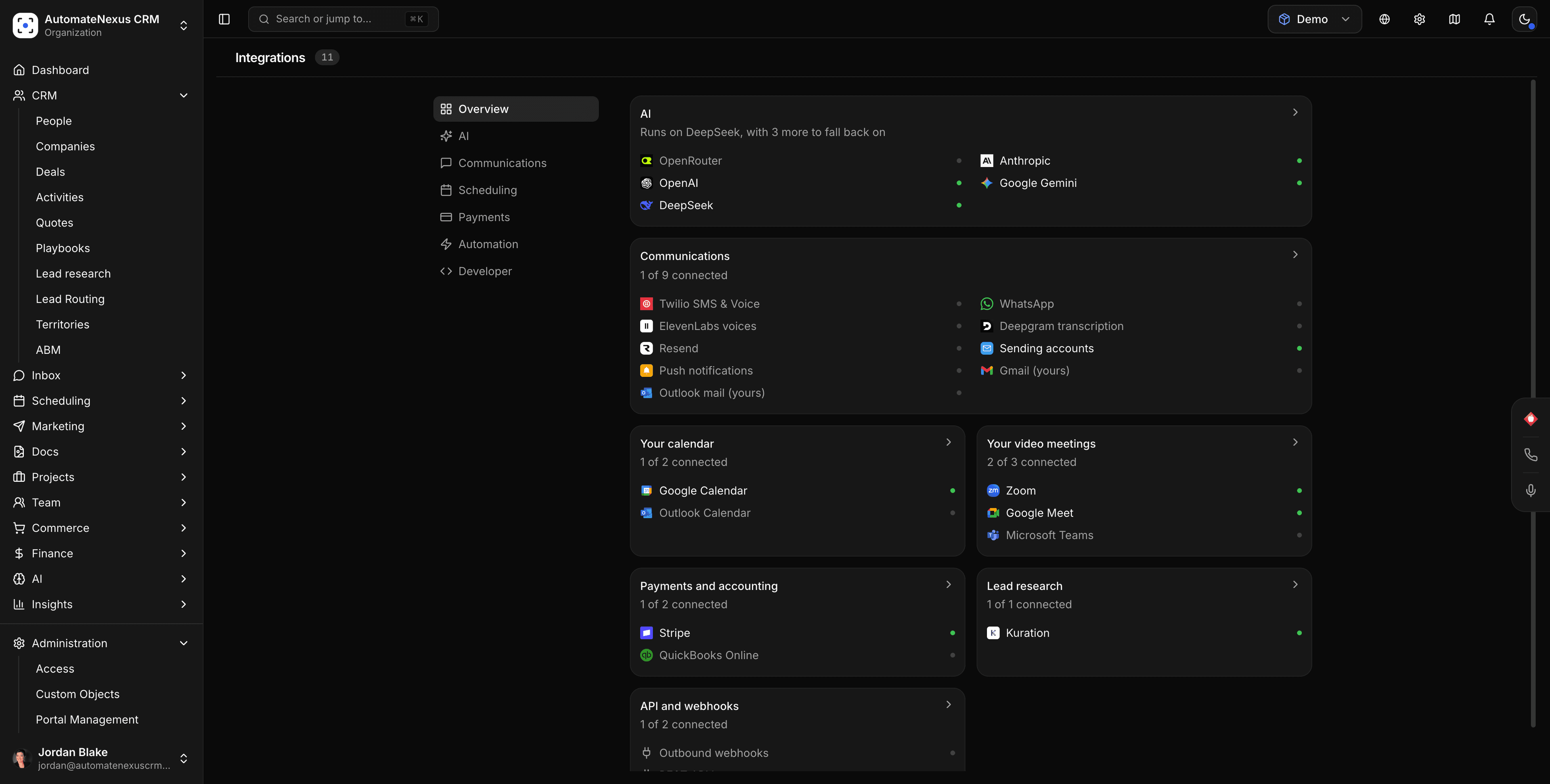
Twilio, wired into your pipeline.
- 01
Your Twilio account, your numbers
SMS conversations and campaigns, the in-app softphone and Power Dialer, WhatsApp and the AI phone receptionist all run on the Twilio account you connect. Twilio bills the usage; the CRM does not charge per message or per minute.
- 02
Numbers bought in the app
Under Inbox → Communication Hub → Phone numbers, search and buy a US, Canadian or UK number, or connect one you already own. Its voice and messaging webhooks are set for you.
- 03
Every conversation on the record
Texts and calls land in the Communication Hub inbox next to email, WhatsApp and website chat, threaded to the contact, with status per message and the customer's deals a click away.
Connected in three steps.
- Step 01
Connect Twilio
Settings → Integrations → Communications → Twilio: paste your Account SID, Auth Token and a phone number in E.164 format, click Save and switch the card on.
- Step 02
Get or connect a number
Buy one in the Communication Hub or click Check Twilio to connect an existing number. For a number you manage in the Twilio console, paste the card's Inbound SMS and Inbound Voice webhooks into the number's Messaging and Voice settings.
- Step 03
Enable browser calling
For the softphone and Power Dialer, add a Twilio Standard API key and a TwiML Application whose Voice URL is the address on the card, then paste the app's SID. The card shows Configured.
Built to be left alone.
The AI receptionist answers
Switch it on under AI → AI communications → Calls. It greets callers in your business's name, answers from your instructions and Knowledge Hub, transfers to your directory, takes messages and appointment requests, and leaves a summary and transcript on every call.
Recordings stay yours
Call recording plays the recording notice first and begins after it. Recordings are fetched with your own Twilio credentials, so they are never public.
A2P 10DLC for US texting
Business SMS to US and Canadian numbers needs A2P 10DLC registration in Twilio; without it, messages fail. The Twilio Console's error logs show why a message did not send.
Calls, texts and the receptionist, on one line.
SMS both ways
Start a text from the inbox or a contact, reply in the thread, and run SMS campaigns from Marketing. Inbound texts create or continue the conversation and can trigger automations.
Calls from the browser
Click to call from a record, work a list with the Power Dialer, and see call history under Calls. Business hours, greeting, voicemail, transfers and recording live in the receptionist's settings.
The receptionist's minutes
Set a longest-call limit (ten minutes by default, up to sixty) and an optional monthly minute cap as your own spending guard. Screening asks unverified callers to press 1, so robocalls never use a minute.
Twilio's rates, nothing on top.
Twilio bills the usage
Numbers, messages and minutes are charged by Twilio to your account at Twilio's published rates; the number price shown in the app is what Twilio charges.
Optional voices and transcription
Add an ElevenLabs key for a lifelike receptionist voice and a Deepgram key for meeting transcription; without them, callers hear Twilio's built-in voice. Both bill your own accounts.
Included on every plan
Calling, texting, call recording and the receptionist are on all four plans; you pay for seats and storage, and Twilio bills your own account for usage.
Twilio and AutomateNexus CRM, answered.
Yes. SMS, voice, WhatsApp and the AI receptionist run on the Twilio account you connect with its Account SID and Auth Token, so Twilio bills you directly and the CRM adds no per-message or per-minute charge.
Yes. Under Inbox → Communication Hub → Phone numbers, Find Available Numbers buys a US, Canadian or UK number on your Twilio account, with its webhooks set for you; Check Twilio connects a number you already own.
A Twilio Standard API key (SID and secret) and a TwiML Application whose Voice URL is the address shown on the Twilio card. Once saved, the card shows Configured and the softphone and Power Dialer work.
An AI provider key of your own, or AI credits, for it to write its replies. An ElevenLabs voice is optional; without one callers hear Twilio's built-in voice. An owner or admin switches it on.
Check the Account SID and Auth Token, the card's switch, your Twilio balance and the E.164 format of the number. For US and Canadian recipients, complete A2P 10DLC registration in Twilio; its Monitor → Logs → Errors page shows the reason.
Only if you turn recording on in the receptionist's settings. Every recorded call starts with the recording notice, and recordings are fetched with your own Twilio credentials, never exposed publicly.
Put Twilio to work.
Start your 7-day free trial and connect Twilio on day one. No credit card, no middleware.