Overview#
The AI phone receptionist answers calls to the phone numbers on your own Twilio account, in your business's name. It greets callers, works out what they need, answers questions from your instructions and your Knowledge Hub, puts callers through to the people in your transfer directory, takes messages, takes appointment requests, and can text a caller a link or an address during the call. It speaks eleven languages, recognizes callers who are already customers or contacts, and leaves a summary, a transcript and, if you choose, a recording on every call.
It runs on your own accounts: Twilio for the phone line and minutes, your own AI provider key (or the included model) for the replies, and ElevenLabs or OpenAI for the voice if you want one beyond Twilio's. AutomateNexus CRM does not charge per minute.
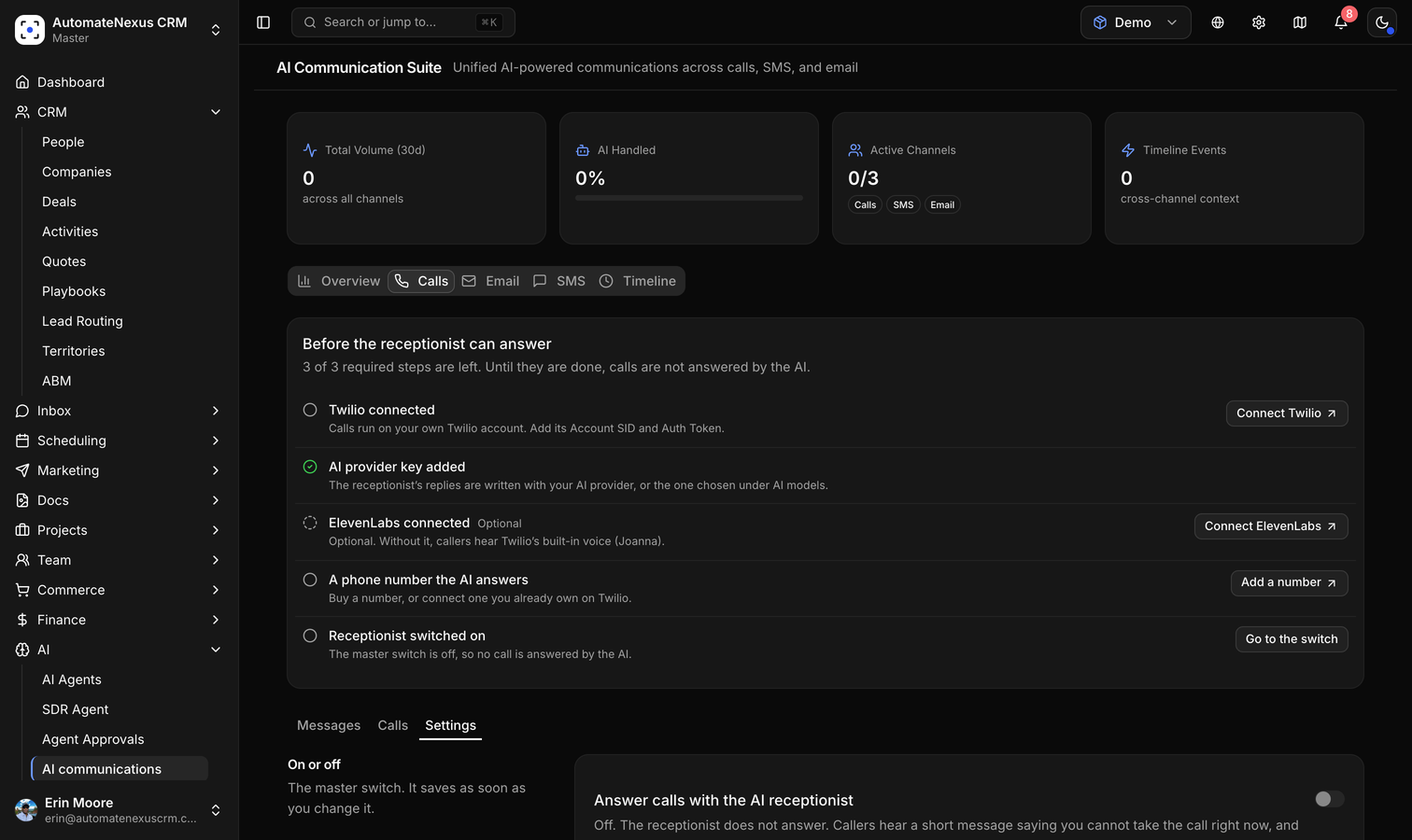
You will find it under AI → AI communications. The Calls tab holds three views: Messages (what the receptionist has taken), Calls (the last thirty days, call history and a test call) and Settings.
Prerequisites#
- A Twilio account of your own, connected under Settings → Integrations → Communications with its Account SID and Auth Token. See Communication Integrations.
- A voice-capable phone number the receptionist answers: bought in the app or connected from your Twilio account (below).
- Optionally, an AI provider key under Settings → Integrations → Automation, in the AI providers section. Without one, replies are written by the included model. See AI Provider Configuration.
- Optionally, an ElevenLabs key (also under Communications) for a lifelike voice. Without it, callers hear Twilio's built-in voice.
- An owner or admin account to switch the receptionist on. Other members can read the settings but not change the switch.
The Settings view opens with a checklist of exactly these things. Until the required ones are done, calls are not answered by the AI.
Getting a Phone Number#
Numbers live under Inbox → Communication Hub → Phone numbers.
- To buy one, use Find Available Numbers: choose the country (United States, Canada or United Kingdom), add an area code if you want a local one, click Search Numbers and buy the one you like. The monthly cost shown is what Twilio charges your account.
- To use a number you already own, click Check Twilio under Numbers on your Twilio account and connect it.
A number bought or connected here has its voice and messaging webhooks set for you. For a number you configured elsewhere, copy the Inbound Voice webhook from the Twilio card under Settings → Integrations → Communications into that number's Voice configuration in the Twilio console, under "A call comes in".
Each number has an AI answers this number switch in the receptionist's Phone numbers section. It is on by default; with it off, that number's callers go to your forwarding number, or hear a short message if you have none.
Switching It On#
- Open AI → AI communications → Calls → Settings.
- Work through the checklist at the top until every required step shows as done.
- Under On or off, turn on Answer calls with the AI receptionist. It saves as soon as you change it.
- Place a Test call from the Calls view: enter your own phone number, choose which of your numbers to call from, and click Call my phone. The receptionist rings you and behaves exactly as it will for a customer.
Identity, Language and Voice#
- Business name — how the receptionist names your business when it speaks to callers.
- Greeting — the first thing callers hear. Left blank, it says "Thank you for calling your business. How can I help you today?" in the receptionist's language.
- Instructions for the receptionist — what it should know and how it should behave on every call: what your business does, the tone to take, what to offer and what to stay away from. Plain sentences work best. Anything a caller might ask about in detail belongs in your Knowledge Hub (Docs → Knowledge Hub), which the receptionist searches during the call.
- Language — one per receptionist: English (US, UK, Australia), Spanish (Spain, Mexico), French (France, Canada), German, Italian, Portuguese (Brazil) or Dutch. It listens and speaks in that language.
- Voice — Twilio's built-in voice for the language, an ElevenLabs voice from the list or any voice ID from your own ElevenLabs library, or an OpenAI voice chosen under AI models. Listen plays a sample in the voice calls really use.
AI Models#
Three choices decide how a call runs. Only models fast enough for a live conversation are listed, and every choice can be left on Automatic.
- How callers are heard — Automatic (Twilio chooses), Deepgram Nova-3, Google's phone-call model or Twilio's conversation model. A model is only used for a language it supports; otherwise the call listens automatically.
- Replies written by — Automatic, the included model, or any AI provider you hold a key for (OpenAI, Anthropic, Groq, Google, Mistral, DeepSeek, OpenRouter), with a fast model pre-selected and the option to pick another from the list.
- Spoken by — ElevenLabs (Flash v2.5 for the fastest reply, Turbo v2.5, Multilingual v2), OpenAI (GPT-4o mini TTS or TTS-1, with their voices) on your OpenAI key, or Twilio's built-in voice.
Business Hours#
With Always open on, every call is handled the same way at any hour. Turn it off to set opening hours per day in your time zone and add closed dates, such as holidays and one-off closures, each with an optional label. Outside those hours, choose what happens:
- Take a message — callers are told you are closed and asked for their name, number and what the call is about.
- Answer anyway — the receptionist has its normal conversation, knowing that you are closed, and prefers taking a message for anything that needs a person.
- Forward the call — callers are connected to a forwarding number from your transfer directory instead of talking to the receptionist. If nobody picks up, the receptionist takes a message.
The After-hours message replaces the greeting when you are closed.
Transfers and Escalation Words#
The Transfers section is a directory of the people and teams a caller can be put through to: a label, a phone number and a line on what it is for ("Pricing, quotes and new orders"). The receptionist transfers only to entries in this directory, tells the caller who it is connecting them to first, and never dials a number a caller gives it. If a transfer goes unanswered, it offers to take a message instead.
Escalation words are phrases such as "speak to a person" that cut the conversation short: when a caller says one, the receptionist offers to put them through to your directory's default contact, or to take a message and promise a call back when nobody can take a transfer.
Screening and Voicemail#
- Ask unverified callers to press 1 — a caller whose number failed the carriers' verification (STIR/SHAKEN) hears "To be connected, please press 1" before the receptionist answers. Robocalls and spoofed numbers cannot press it, so they never use a minute. Calls with no verdict are not screened.
- Turn away withheld numbers — callers who hide their number hear one line and the call ends.
- Blocked numbers — one per line, with the country code. These callers hear one line and the call ends; nothing is recorded and no minute is used.
- Offer voicemail when a caller can't be understood — after two turns with nothing understood, the receptionist asks the caller to leave a message after the tone. The recording lands in Messages with the caller's number and plays back there. With this off, the call ends with a goodbye instead.
Limits and Recording#
- Longest call — at this length (ten minutes unless you change it, up to sixty) the receptionist tells the caller it has to end the call, and hangs up.
- Monthly minute cap — your own spending guard. Once the receptionist has used this many minutes in a month it stops answering until the next month, and the people who receive its messages are told once. The section shows the minutes used so far. Leave it empty for no cap.
- Record calls — when on, every call starts with the Recording notice ("This call may be recorded for quality and training purposes." unless you write your own) before the greeting, and recording begins only after it has been said. Recordings play back from the call history and are fetched with your own Twilio credentials, so they are never public.
What Happens on a Call#
- The caller hears the recording notice if recording is on, then the greeting for the number they called.
- If the caller's number belongs to a customer or a contact in your CRM, the receptionist knows who they are, their company and role, and a customer's open deals. It uses this to help; it never reads deal details out.
- It answers questions from your instructions and your Knowledge Hub articles, keeping replies short enough for the phone.
- It can put the caller through to someone in the directory, take a message (name, number, what it is about, how urgent, and who it is for), or take an appointment request. When it is better written down, an address, a link or your opening hours, it can send the caller one text message during the call, to the number they are calling from and to no other.
- An appointment request goes through the same approval gateway as every agent action. Unless you have allowed the receptionist agent to create meetings on its own (its autonomy level under AI Agents), the request waits in AI → Agent Approvals, your team is notified, and the caller is told "I've passed your request to the team. They will confirm by text or email." It is only ever told "You're booked for…" when the meeting really exists.
- When the call ends, the Calls view holds its summary, transcript, sentiment and recording, and a call activity with the summary and length is written to the customer's or contact's timeline.
Messages and Notifications#
The Messages view lists everything the receptionist has taken: who called, their company and number, what it is about, how urgent, who it was for, and for a voicemail a Play voicemail button. Filter unread or all, mark a message read or unread, and open the contact from it.
Under Message notifications in the settings, choose who is told when the receptionist takes a message or a booking request. With nobody chosen, every owner and admin is notified. Each of them gets a notification in the app, which the platform also emails when it stays unread.
- Also text these numbers — up to ten mobile numbers, one per line with the country code, texted from the receptionist's own number when it takes a message, a voicemail or a booking request. At most thirty alerts go out per day, so a spam storm never becomes a phone bill.
- Push notifications — the same events on the notified people's phones and computers, wherever they have turned push notifications on in their own notification settings.
The Calls View#
It opens with the last thirty days: calls Answered, calls Placed, Transferred, Messages taken, Appointments booked and Talk time with the average per call. Below is the Test call card and the Call history: every call with its summary, sentiment, transcript and recording, and the caller's name when the number was recognized.
A Different Front for Each Number#
An organization that runs two brands, or a main line and a sales line, can have the same receptionist answer each number in its own name. In the Phone numbers section, click Customise on a number and set its business name, greeting, instructions and language. Anything left blank comes from the shared settings, and a number with its own front shows an "Own front" tag in the list.
Costs#
- Twilio bills your account for the number and for the minutes of each call, at Twilio's rates for your country. Transfers are two legs of the same call.
- AI replies run on your own provider key at that provider's rates, or on the included model when you have not added one.
- Voices from ElevenLabs or OpenAI are billed to those accounts. Fixed lines such as the greeting are synthesized once and reused, so they cost almost nothing over time.
- AutomateNexus CRM adds no per-minute charge. The monthly minute cap is there to guard your own spend.
Troubleshooting#
- "Calls are not answered by the AI." The checklist at the top of Settings names what is missing: Twilio not connected, no number with "AI answers this number" on, or the master switch off.
- Calls ring through to nobody, or Twilio plays an error. The number's voice webhook is not pointing at the CRM. Reconnect the number from Phone numbers, or paste the Inbound Voice webhook into the Twilio console.
- "This number cannot take voice calls." The number was bought without the voice capability. Buy one with Voice listed.
- The receptionist answers but cannot reply. Check the AI provider key under Settings → Integrations → Automation, or set Replies written by to the included model.
- Callers say it sounds robotic. Connect ElevenLabs and choose Flash v2.5 under Spoken by, or an OpenAI voice.
- It cannot understand callers. Under How callers are heard, choose Deepgram Nova-3 for your language.
- It stopped answering mid-month. The monthly minute cap was reached. Raise or clear it under Limits.
- Nobody gets the messages. Under Message notifications, tick the right people, add numbers to text, and check that those people are still members of the organization.
Frequently Asked Questions#
Does it use my own phone number?#
Yes. It answers numbers on your own Twilio account, bought in the app or connected from Twilio, and calls and texts show your number to the caller.
Can it transfer to my mobile?#
Yes. Add your mobile to the transfer directory with a label and what it is for. The receptionist can only ever transfer to numbers in that directory.
Does it book appointments?#
It takes the request and passes it to your team for approval, and tells the caller so. If you allow the receptionist agent to create meetings on its own, it books and confirms on the spot.
What does a caller hear when we are closed?#
Your after-hours message, then whichever you chose: a message is taken, the receptionist helps anyway, or the call is forwarded.
Can two numbers have different greetings?#
Yes. Customise each number in the Phone numbers section; anything you leave blank falls back to the shared settings.
Which languages does it speak?#
English (US, UK, Australian), Spanish (Spain, Mexico), French (France, Canada), German, Italian, Brazilian Portuguese and Dutch, one per receptionist or per number.
Is there a limit on calls or minutes?#
Only the ones you set: the longest call and the monthly minute cap. AutomateNexus CRM does not meter or charge for minutes; Twilio bills them to your account.
Related Articles#
- Communication Integrations — Connect Twilio and ElevenLabs, the accounts the receptionist runs on.
- AI Provider Configuration — Add the key that writes the receptionist's replies.
- Communication Hub — Where your phone numbers, the dialer and telephony analytics live.
- AI Agents & Support Center — The receptionist agent's autonomy level and the approvals inbox.
- AI Meeting Notes — The notetaker for the meetings the receptionist books.