Overview#
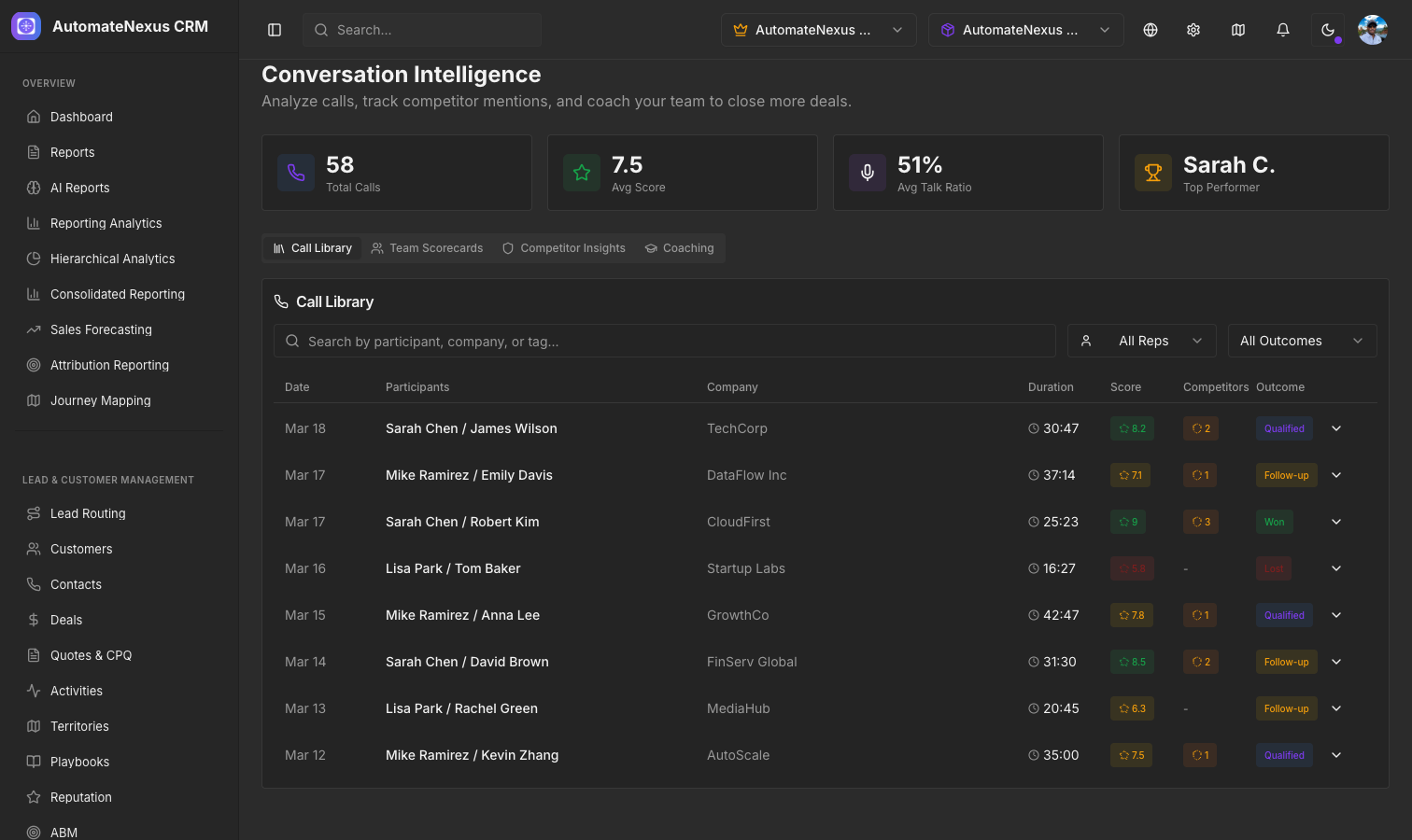
Conversation Intelligence analyzes your sales calls using AI to extract actionable insights, identify coaching opportunities, and track competitive mentions. It turns every call into a learning opportunity for your team.
You will find it under Insights → Conversation Intelligence. The page header shows how many calls have been recorded for your organization, and four tabs hold the detail: Call library, Team scorecards, Competitors and Coaching. Each view fills in once a call has been recorded and analyzed; until then it shows an empty state that says so, such as "No calls recorded yet. Calls appear here once call recording is connected."
Talk-Time Analysis#
The Talk-Time Ratio card, on the Coaching tab and inside each call in the Call library, shows who spoke during the call:
- Rep vs. prospect ratio — Displayed as a stacked horizontal bar, with each side's percentage
- Ideal range indicator — The optimal talk ratio is 40-60% for the rep. A marker on the scale shows where the call landed, labeled Ideal Range, Rep Too Quiet or Rep Talking Too Much
- Monologue Alerts — Flags segments where one person talked for more than 2 minutes straight, with the speaker, the start time and the length
Competitor Mentions#
The Competitors tab, and the Competitor Mentions card inside each call, lists the competitors detected in the conversation:
- Competitor name and mention count
- Context snippets showing what was said
- Sentiment for each snippet (Positive, Negative or Neutral)
- Timestamps for quick reference
A call with nothing detected reads "No competitor mentions detected in this call."
Coaching Scorecards#
The Coaching Scorecard card scores a rep's call by category, each out of 10, with the overall score shown as a badge. A radar chart provides a visual representation, a Score Trend (Last 5 Calls) sparkline shows improvement over time, and AI Recommendations suggest specific areas for improvement. Until call recordings are analyzed, the card reads "No coaching data yet."
The Team scorecards tab collects the scorecards generated from analyzed calls for the whole team; it reads "No scorecards yet" until call recording is connected.
Call Library#
The Call library tab is a searchable, filterable archive of recorded calls. Search by participant, company, or tag. Filter by rep (All Reps) or by outcome (All Outcomes: Qualified, Follow-up, Won, Lost). Each row shows the date, participants, company, duration, score, number of competitor mentions and outcome. Click any call to expand its full analysis inline: its tags, the Talk-Time Ratio, the Competitor Mentions and the Coaching Scorecard for that call.